QMD: semantic search for your local markdown files
I've moved to Markdown as my primary writing format across everything I do. This blog, presentations via Marp, notes in obsidian, and all documentation in repositories.
Markdown is king
What I love about Markdown is the same thing I loved about LaTeX when I was a student writing reports and my thesis: content is completely separated from layout and style. This allows for better focus, because I focus on only one thing at a time.
What I also like about markdown, is that it is an ideal format for git version control. It is plain text and I write one sentence per line. This allows version control to work really well with all the benefits that gives: a nice overview of the history, better collaboration on the same documents, and it fits in nicely with my code repositories.
On top of that, Markdown is the ideal format for working with AI agents and LLMs. It is structured enough for machines to parse, readable enough for humans to skim. Also when you feed it into an AI system, almost everything is pure content, so it is very 'token-efficient'.
How to find what I'm looking for?
In roughly 9 months of using Obsidian I've accumulated over 1,170 notes (this number is a bit inflated, since it includes 612 imported notes from OneNote). I also work with a lot of documentation that is written on Confluence. Adding this documentation as context to my local AI agents can be very powerful. Using a Confluence to markdown exporter app that I've build (I might share this at some later point), I've again added hundred to thousands of markdown files. Filename or keyword search starts to feel like a blunt instrument. Often I know what I am looking for conceptually, but I cannot quite remember the exact phrase.
Semantic search
Beyond keyword search there are smarter techniques. A technique such as semantic search is an approach that I've been interested in for a while. Classic keyword search just does string matching, but semantic search means you search for the meaning behind your search query. Under the hood, the search query gets encoded into a vector that represents the semantic content. The documents (or chunks of these documents) are also stored as vector representations in a vector database. Then using approximate nearest-neighbor (ANN) lookup it is possible to find the documents that best match the search query mathematically in this high dimensional semantic space.
In practice this will mean that if you search for "meeting note with my colleague about database migration", that the semantic search can find a list of notes covering just that topic even if these didn't use those exact words.
RAG
RAG (Retrieval-Augmented Generation) is a technique that combines (semantic) search with an LLM so you can ask questions and get answers grounded in your own documents. The retrieval part of RAG can be built in a number of ways, but semantic search is the most common.
About a year and a half ago I got to experiment with this hands-on. I was the tech lead at Future Facts on a small internship project with SpikeUp. SpikeUp is a Dutch foundation that offers refugees a training program to get started in the world of Data and AI, which I've been supporting by offering free mentorship and trainings since 2023. Together, me and the SpikeUp interns built an AWS-native RAG system from scratch.
QMD
But, how can I add semantic search on my own notes, my own docs, and leverage this with my own AI agents, locally and privately, without sending anything to the cloud? The answer I landed on is QMD.
QMD is an on-device search engine for markdown notes, meeting transcripts, documentation, and knowledge bases. Everything runs locally. No data leaves your machine. It is MIT licensed: meaning everyone is free to use it, even for commercial purposes. It has been in development for only 5 months now and already racked up 24K Github stars.
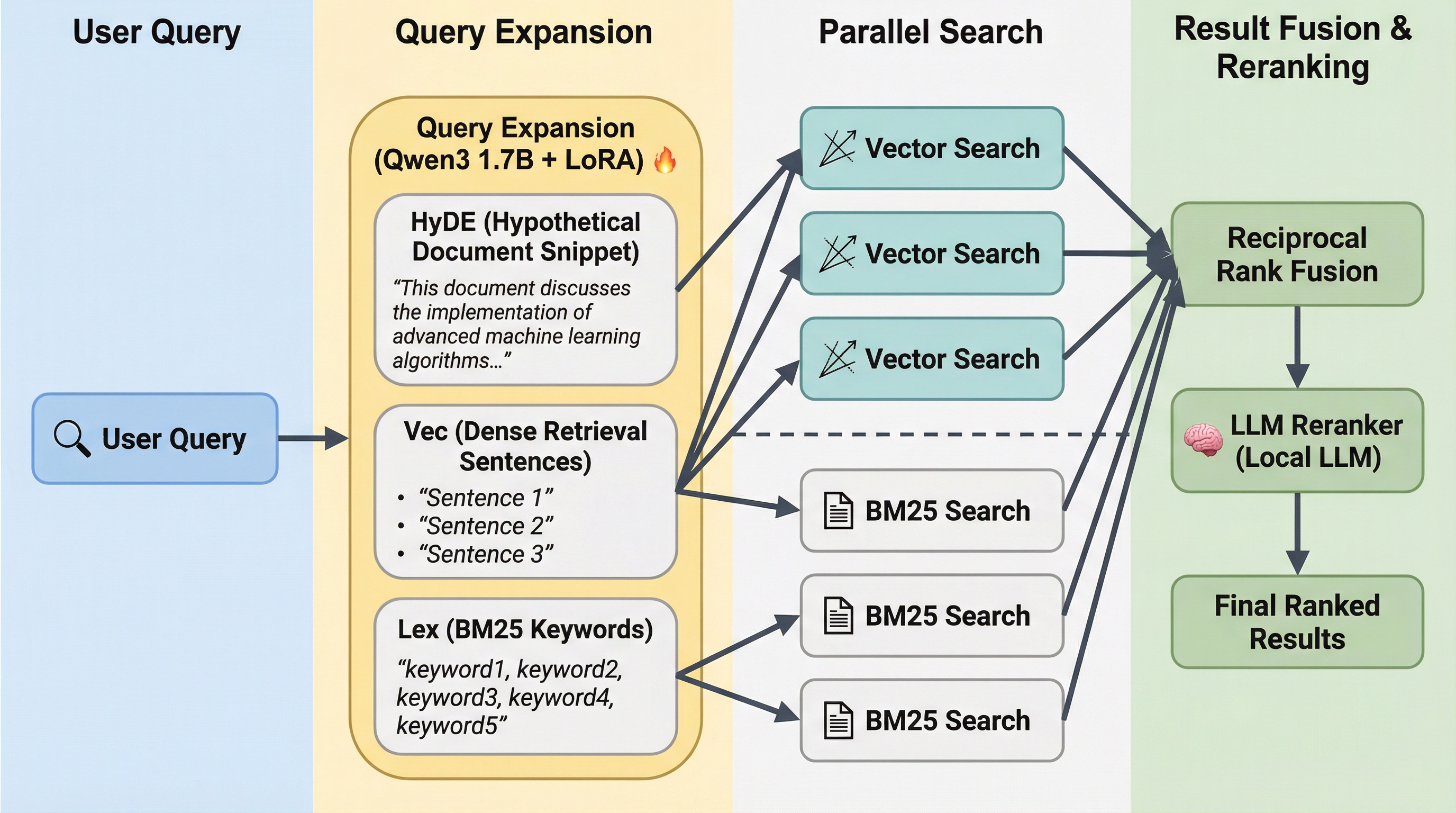
Under the hood it combines three search techniques:
- BM25 full-text search: classic keyword matching
- Vector semantic search: embeddings generated locally via node-llama-cpp with GGUF models
- LLM re-ranking: a local model scores and reorders the candidates
Results from the first two are blended using Reciprocal Rank Fusion (RRF), then the re-ranker picks the best ones. The combination is significantly better than any single technique on its own.
The three GGUF models weigh about 2GB total and are downloaded once on first use. After that, everything runs offline.
QMD exposes three search commands:
search: BM25 keyword searchvsearch: pure vector semantic searchquery: the full hybrid pipeline with expansion and re-ranking
Output formats include CLI (with clickable file links in the terminal), JSON, CSV, Markdown, and XML. The project also allows for an easy configuration of an MCP server.
QMD + Obsidian
If you use Obsidian, there is a community plugin: obsidian-qmd.
It wires QMD directly into Obsidian's search, with:
- Semantic-first search and automatic keyword fallback when there are no results
- Background indexing triggered by vault changes
- No cloud, no signup. Fully local and private.
One practical note: Obsidian runs with a more limited shell environment than your terminal, so it may not pick up the same PATH, Node runtime, or qmd binary.
The reliable setup that works for me is to point the plugin at a small wrapper script instead of the bare qmd binary.
The wrapper pins the correct Node runtime, sets local config and cache paths, and makes the whole thing predictable regardless of how Obsidian launched.
QMD + AI agents
For builders, QMD ships with a built-in MCP server, so any MCP-compatible agent can call it directly with query, get, multi_get, and status tools.
There is also a ready-made agent skill you can install into any Claude Code project or agent framework that is compatible with these skills:
npx skills add https://github.com/tobi/qmd --skill qmd
This gives the agent semantic search over whatever collection you point QMD at: your project's documentation, your notes, your Confluence exports. All right inside the agent loop, without any external API calls.
One thing worth knowing from my own setup: the out-of-the-box skill calls qmd directly and writes its index to ~/.cache/qmd.
If you work across multiple projects that each have their own documentation, that shared cache quickly becomes a mess.
A small repo-local wrapper script that sets QMD_CONFIG_DIR and XDG_CACHE_HOME to .tmp/ inside the repo keeps each project's index isolated and predictable.