Automating data analysis with AI coding agents
"Just let the agent query the database" hides a surprising amount of setup.
Writing SQL is the part an agent is already good at. Answering a question about your data is a different job, and it needs two things that do not come for free. The agent needs a safe way to reach the data, and it needs enough context to know what that data actually means. Skip either one and you get a confident, well formatted, completely wrong answer in about ninety seconds.
Recently I needed to validate a data migration: the same tables produced by an old pipeline and a new one, and a decision to make about whether consumers of the data could switch to the new source. Dozens of tables, the same method each time, high enough stakes that a wrong "looks fine" would land in production. That is exactly the kind of work an agent should be good at. It took a while before it actually was.
The loop I started with
The first version of this was not automation. It was me, copying and pasting relevant information.
- Explain the problem to the agent, paste in whatever context I thought it needed.
- Agent writes a query.
- Query is not correct for one of many reasons.
- Agent didn't use database-specific SQL dialect correctly.
- Agent didn't use the correct schema name, table name, or column name.
- Agent made an incorrect assumption about how to answer the question: the SQL itself might be technically correct, but it can still be functionally incorrect for a large number of reasons.
- I give feedback on the query.
- Copy back the error if there is any.
- I explain what schema/table/view/column to actually use.
- I explain the relevant business context needed to understand the question better.
- Back to step 2.
Ten or more iterations like this for a single question was normal.
The agent was not the bottleneck in that loop. I was. Every one of those steps is me hand-carrying either access or context across a gap the agent could not cross by itself.
The two gaps
Access. The agent could not run a query. It could only write text and wait for me to execute it. That turns every syntax error into a two-minute human round trip instead of a quick retry.
Context. This is the bigger one, and it has two halves. There is the structural half: the view and table definitions, the documentation, the lineage. And there is the half that lives in people's heads. What do all the company specific abbreviations mean? What a given column actually means, which of the five date fields is the one that matters, why a specific table has a weird gap in 2024, and what specifically you are trying to find out.
An agent that has neither is just like a very fast junior on their first morning: no access yet, and no understanding of the business context and technical context.
Fix 1: run the agent where the code lives
The logic that produces our data lives in a git repo. I know that is not universally true and some teams still update views/tables directly in the database. But in my opinion this is essential.
There are many ways to configure a git repo to handle all your database logic and the details differ per platform. They all come down to the same thing: a deployment pipeline that syncs code in a repo to your database, warehouse or lakehouse. dbt is one of my preferred tools that help accomplish this in a nice way.
Once you have all your database's logic in one git repository, it is quite trivial to give access to your AI agent. Now it can read the table definitions, follow a column back through the transformations that produced it, and work out the lineage by itself instead of asking me for it. That one change removed most of the "paste in whatever context I thought it needed" step, and it removed it permanently, because the repo stays current on its own.
Fix 2: write down what the repo does not say
The repo tells the agent what the code does. It does not tell the agent what any of it means, or how to work with it, and it never explains 'why'.
So I started writing that part down, in markdown, in the repo.
README.md, AGENTS.md, and other additional context files can be really nice for this.
Documenting the code itself is also important. Inline comments can be nice, but a tool like dbt also provides strong mechanisms for this.
Agent Skills are another great mechanism: instructions an agent loads when a task matches the skill documentation.
For my specific use case I did it in the following layered approach:
README.mddescribes everything that is relevant for the human-reader as well as the agent reader.AGENTS.mddescribes everything that is only relevant for the agent-reader.- Since this is added to every agent session, it is important to keep it concise.
- A powerful method is to point to additional documentation from this file and explain when the agent should read the additional docs.
skills/jupyter-data-analysis/SKILLS.mdexplains all the relevant information on how to analyze data in Jupyter. The agent will pick up this information automatically whenever the given task matches the skill's description's keywords.prompts/<specific_source>_table_validation.prompt.mdis a starter prompt that explains exactly how to do data validation for a specific data source.
None of this is clever. It is the stuff a new colleague picks up in their first two weeks, written down. The difference is that the agent starts every single session as a new colleague.
What missing context costs
Letting the agent write and run its own queries has hidden risks that can cause serious costs. Without proper context, the agent still produces an answer; it just guesses at the parts nobody wrote down. I have two examples of hidden cost caused by missing context:
- Generated queries can be 'silently' wrong.
- A KPI or definition is guessed and doesn't align with the business. An answer is still generated, but it is actually wrong.
- If follow up actions or business decisions rely on the correctness of the answer, then serious costs can be incurred.
- Generated queries can be technically correct, but very inefficient.
- Without context the agent might not know what tables are big and which are small, which tables are materialized and can be queried efficiently, and which objects are actually views that are very slow to process.
- The agent might write broad
JOINs that take a long time to process or forget to include partition filtering properly. - If you are using serverless compute that scales well (for example via Snowflake or Databricks), then the actual processing cost can be huge, while the answers still appear rather quickly.
Fix 3: let the agent run the queries itself
This is the one that closes the loop, and the one worth being careful about.
The safety story is boring, which is the point. The agent connects with a dev role I own that gives it read access to specific tables, but does not allow it to modify records or drop tables. Additionally, whenever possible I do all analysis work on an acceptance database cluster; this prevents any analysis work from interfering with production workloads.
The workspace enforces that rather than trusting anyone to remember it. In general I never trust an AI agent to follow safety instructions, instead I configure its access such that it can't do any harm.
Why a notebook
There are several ways to give an agent query access. For data analysis specifically, a notebook wins, for three reasons.
- It keeps everything in one place: the query, the result it produced, and the markdown explaining what that result means.
- No other format holds all three at once.
- Both of us can work in the same environment.
- I can read what it did and run a cell myself without moving code or data between runtime environments.
- The results outlive the chat session.
- No code or results stay stuck in the chat session.
- No code or results stay stuck in some database manager.
- The notebook is a finished 'data analysis product' once we are done.
Synchronous vs asynchronous database calls
A notebook is mostly Python, which happens to be my language of choice. Getting the notebook connected to Redshift was a bit of a problem at first.
The obvious first move is a regular database connector: psycopg2 wired up through SQLAlchemy.
Redshift can use the Postgres wire protocol, so any Postgres driver works against it.
That's also roughly how a tool like DBeaver connects, but the team behind DBeaver had years to improve this process.
That a direct connection is not without issues showed up as soon as a query ran long. A twenty-minute query has to survive the Jupyter cell's own timeout, the connector's idle timeout, and the database's timeout on that same connection. It also has to survive anything in between that decides to drop it: a VPN reconnecting, a switch from wifi to ethernet, whatever. Any one of those kills the connection, and the query dies with it, so you start over from zero. A direct connection is fine for something that comes back in a few seconds; it gets worse the longer the query runs.
The fix is the same one you'd reach for with any slow synchronous call to an external service: stop waiting on it synchronously.
Submit the query, let it run server-side, come back later for the result.
For Redshift that's the Data API, called through the AWS SDK boto3.
A statement id is just a string, so the query keeps running after the cell, or even the kernel, that started it is gone.
The whole thing works over aws login.
It also has some downsides. This route needs an AWS account and IAM permissions on top of database access, not just a database user and network access. So this setup might not work for everyone. Some of our users only get a database account and not access to AWS.
I wrapped both routes behind one function, so a direct connector and the Data API both return a pandas DataFrame from the same run_sql call.
The agent never has to know or care which one is underneath.
It is quite straightforward, but some standardization like this prevents an agent from reinventing the wheel and discovering the same bugs over and over.
Agentic workspace diagram
The diagram lays out the whole workspace, not just the Redshift connection described above.
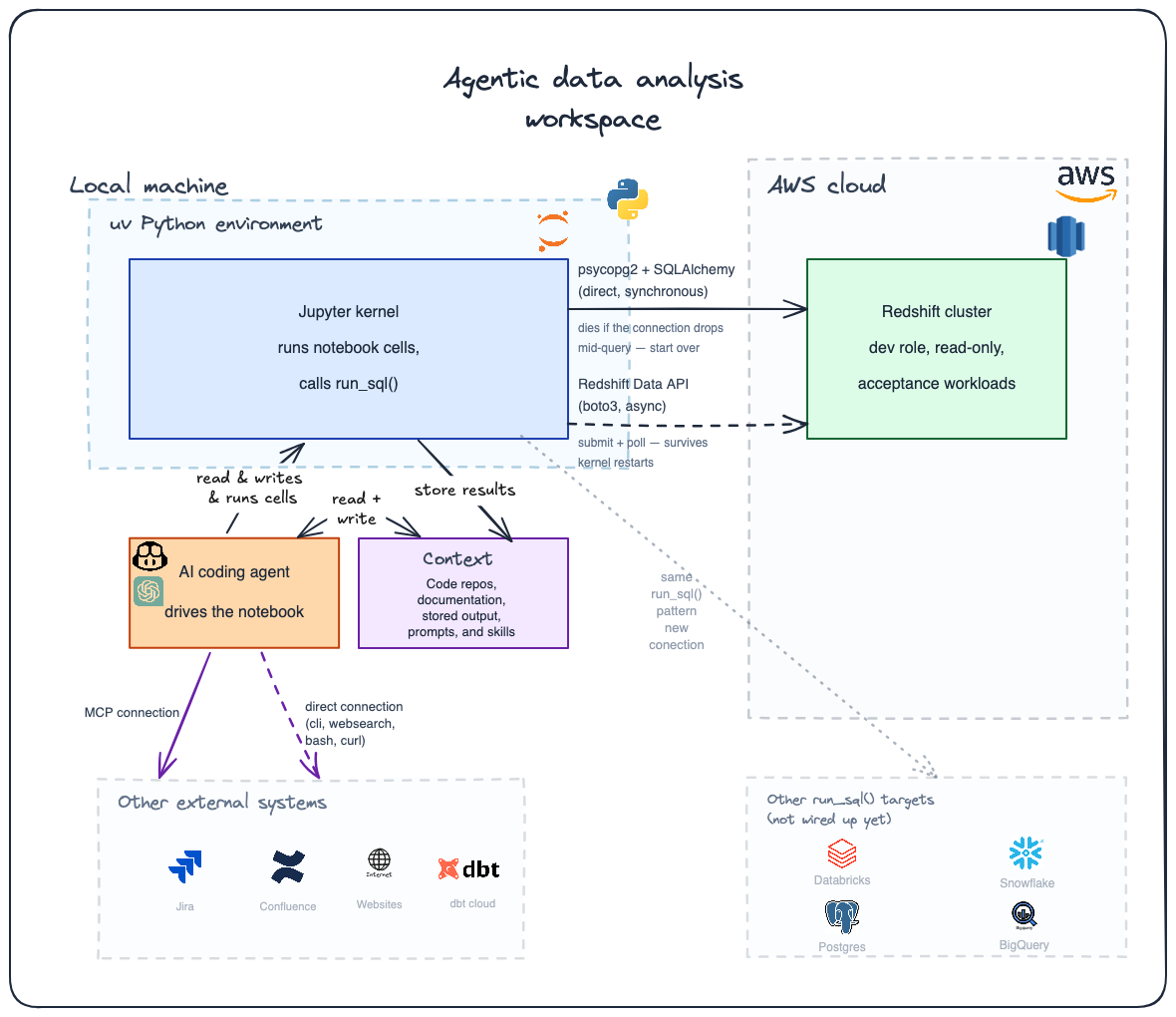
The agentic workspace: a coding agent driving a local Jupyter kernel and the rest of the workspace visualized around it.
- A coding agent (Copilot, ChatGPT, or similar) drives a Jupyter kernel inside a local
uvPython environment, with the code, docs, prompts, and skills from Fix 1 and Fix 2 available to it as context. - The kernel reaches Redshift over the direct
psycopg2connection or the async Data API, both wrapped behind the samerun_sql()call described above. - Added, but not discussed, nor configured in the starter repo: Databricks, Snowflake, Postgres, and BigQuery connections.
- Not configured yet, but a logical extension of the same
run_sql()pattern to warehouses I haven't wired up.
- Not configured yet, but a logical extension of the same
- Added, but not discussed, nor configured in the starter repo: Jira and Confluence access appear as further tools the agent could reach, either over MCP or a direct connection.
- Jira and Confluence access requires the
acliCLI tool and skill, or the Atlassian MCP server.
- Jira and Confluence access requires the
- Added, but not discussed, nor configured in the starter repo: access to additional context.
- How to configure the additional context is quite important.
- Access to GitHub repositories where your code and documentation live is very useful.
Those last items in the list above aren't something this post or the starter repo covers. It's a natural extension, though: point the same agent at the relevant repositories and documentation, and the same "read the code, read the docs" approach from Fix 1 and Fix 2 applies just as well to a wiki page as it does to a dbt model.
The habit that makes the output trustworthy
If you take one thing from this: make the agent write its findings as markdown cells, in the notebook, directly under the output that supports them, with the actual numbers pasted in.
Not a summary in the chat window, and not a separate report written afterwards from memory: a markdown cell, right next to the query result, explaining what that specific number means. Keeping the finding next to its evidence forces the claim to sit where a reviewer can check it in one glance, and it means the reasoning outlives the chat session that produced it. I also feel that agents are better at reasoning about context that sits together: describing a table it just produced and can still see, instead of reconstructing it from memory several messages later. The same logic holds for me as the reviewer. Reading the query, its result, and the explanation together, in one place, produces a better conclusion than reading the same three things in isolation. The notebook stops being a scratchpad this way and becomes the deliverable.
Writing things down like this is also the only thing that survives a Jupyter kernel restart, which happens more often than you'd expect. The SSO token expires and boto3 caches the session inside it, so a restart is the standard fix, not an edge case. Or when your device is turned on and off. Data can change when you read it at different times, and I think it can be wasteful to rerun expensive queries. A markdown cell with the actual numbers pasted in survives that restart; a Python object sitting in kernel memory does not. The same problem is why the notebook parameterises everything at the top: table name, date window, column list, all in one setup cell. The whole thing is then a function of that cell, and reruns cleanly from the top whenever the kernel dies.
None of this makes the conclusion true
A markdown cell may record what the agent believes the numbers mean, and that belief still needs a human to check it. That matters most once the conclusion goes beyond a simple technical fact and starts pointing at a root cause. In my experience an agent is genuinely poor at that kind of diagnosis. Even with all the context described in Fix 2, it is usually missing the pieces that actually determine cause. Things like when a pipeline was failing, when someone else's pipeline was having a bad week at the same time, or when the business first started noticing something was off. Root cause tends to live in that kind of timeline, and it is rarely written down anywhere the agent can read it. Treat the agent's account of what a number is as reliable. Treat its account of why the number is what it is as a hypothesis you still have to check yourself.
What this process brings you
In short: automation and consistency.
This will not save you a lot of work or time at first. The first table took longer than doing it by hand, and the setup above took longer still.
What it buys is that table twelve is done the same way as table one, that the reasoning is written down next to the numbers, and that when someone asks "how did you decide this" in four months there is a notebook that answers.
The agent is good at the mechanical parts: writing the query, casting the columns, formatting the chart, describing the output in prose. It is bad at knowing which of those outputs is meaningless. That judgement stays with you, and everything above is how you hand over the first part without giving away the second.
What it also brings is a consistent 'data analysis product'. As a human, when I do my data analysis I will jump straight to the conclusion whenever I feel like I have the answer. That is because I'm a bit lazy (in a good way). But this means I will miss a nicely documented report with an overview of why something went wrong and what exactly is wrong.
The starter repo
I put a minimal version of the setup on GitHub: redshift-agent-workspace.
Two modules, two example notebooks, a skill file and a prompt file. The getting-started notebook walks through connecting, running inline SQL, running SQL from a file, pushing the result into pandas, charting it, and writing the finding down. The second notebook is a full table comparison with the gates in the order they have to run.
It is a template, not a framework. Clone it, point it at your specific database, and specify your data analysis question.
Good luck with your agentic data analysis! Remember: check your agent's assumptions and conclusions!